Programming
Forking Voicebox into a local voice studio
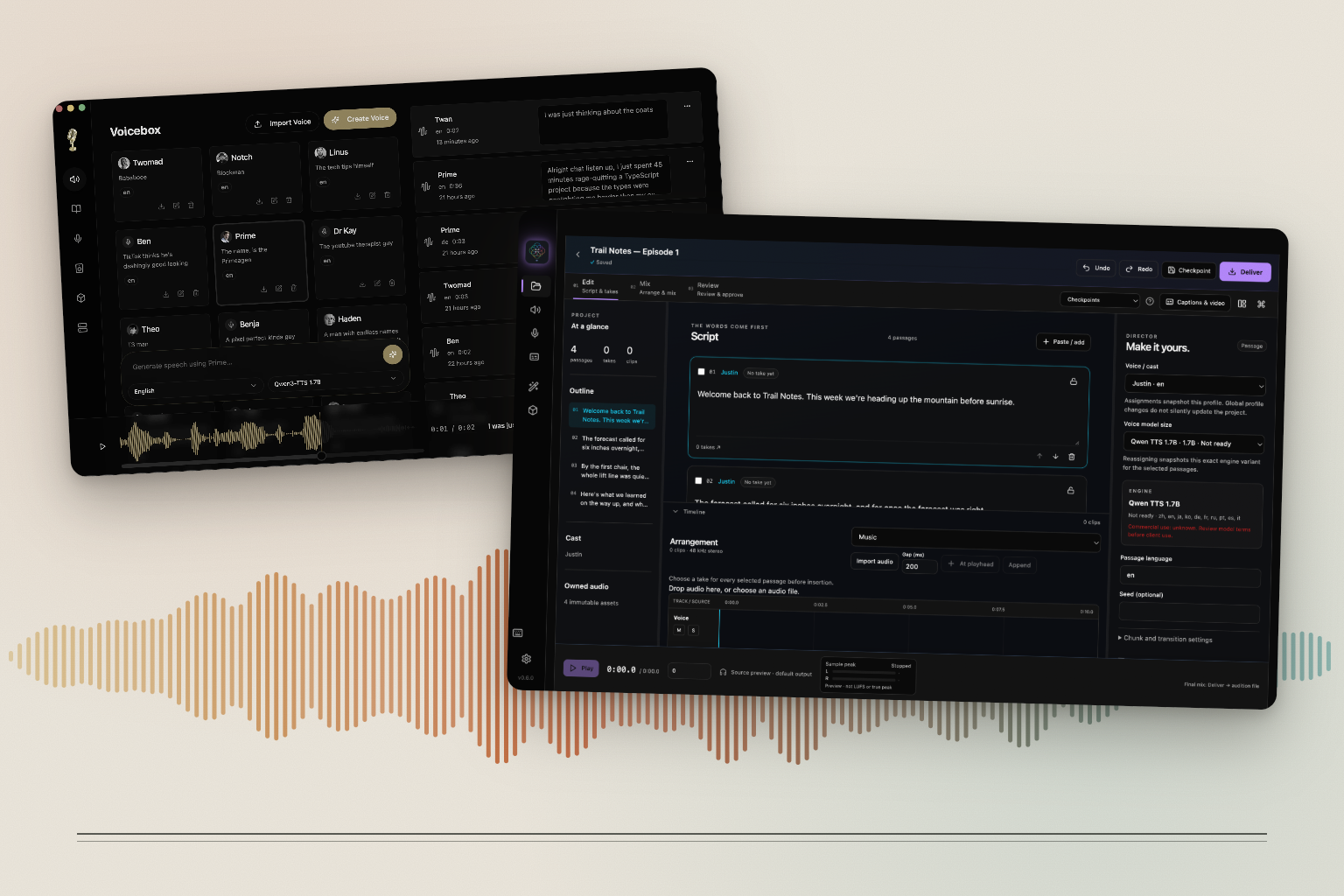
A friend of mine wanted to try voice cloning. The paid services he looked at were good, but they were priced for people producing a lot of audio, and he only wanted to narrate a few projects of his own. He asked whether something local could do the job, with the models running on his own machine and his recordings staying there.
I looked around, and Voicebox seemed the most promising. It's an open-source desktop app by Jamie Pine: a Tauri shell with a React interface and a local Python server that runs the speech models. It could already clone a voice from a short sample, generate speech with several open models, and dictate into other apps. It's MIT licensed, so we were free to change it.
After using it for a while, I found parts of the workflow and interface that I wanted to work differently, and features I wanted that it didn't have. That became Voicebox DS, my fork. It's currently 468 commits ahead of upstream and includes every upstream change so far.
A different flow
Upstream Voicebox puts your voices, the generation box and your history on one screen. That's great for trying a voice quickly. Once you're making something longer, you spend more time scrolling between them than listening.
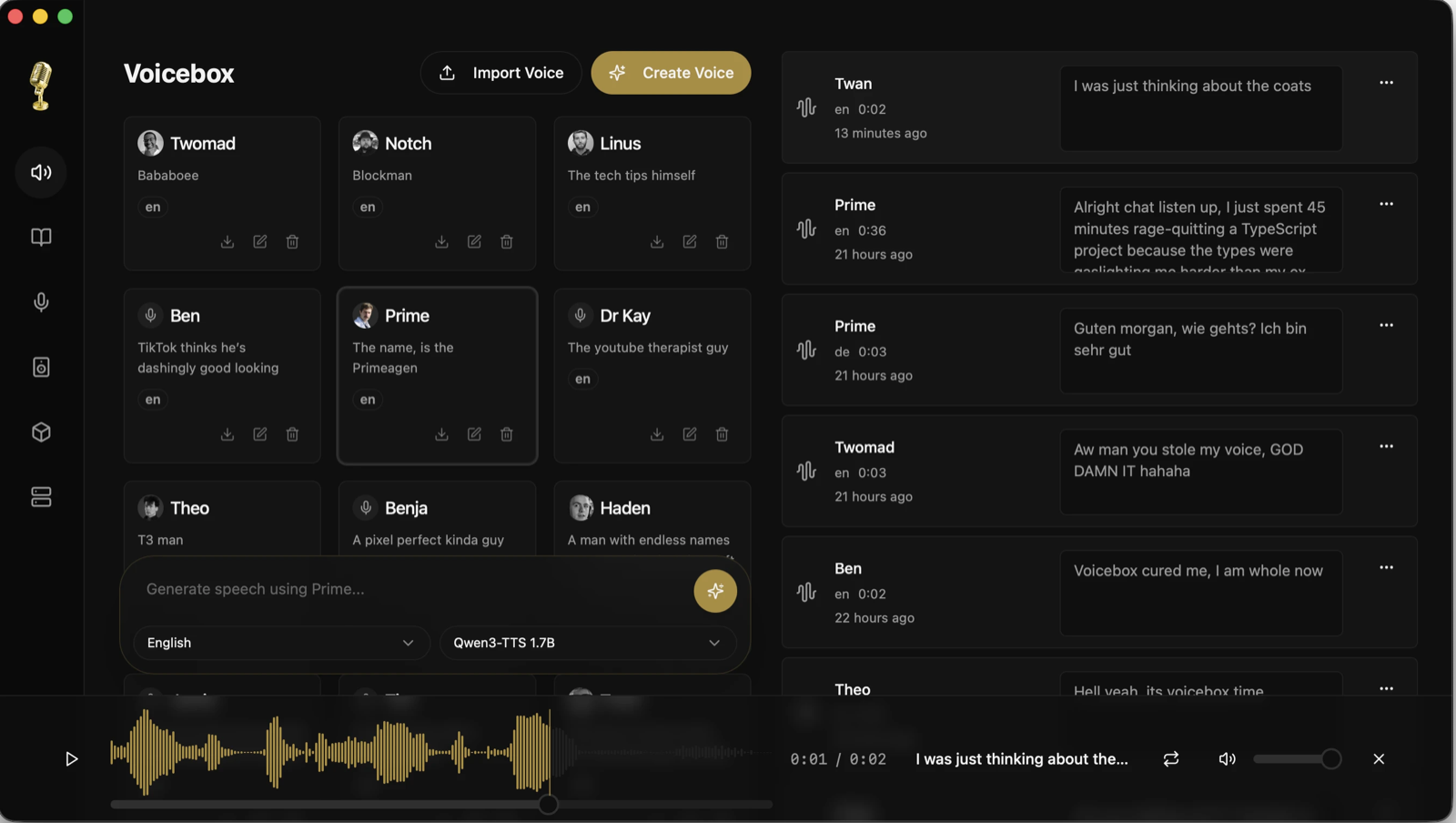
Upstream Voicebox, from the project's README.
The fork has a sidebar with labeled sections: Projects, Generate, Voices and Captures for creating, and Effects and Models for tools. Generate is a form. You choose the voice, engine, language and effects, write the script, and adjust delivery settings like speed. Preview speech plays the audio while it's being generated, without saving it to your history, and your recent takes sit next to the form. Voices became a table with a detail panel for reference samples, quality guidance and default effects. There are also app-wide keyboard shortcuts, with an overlay that lists them.
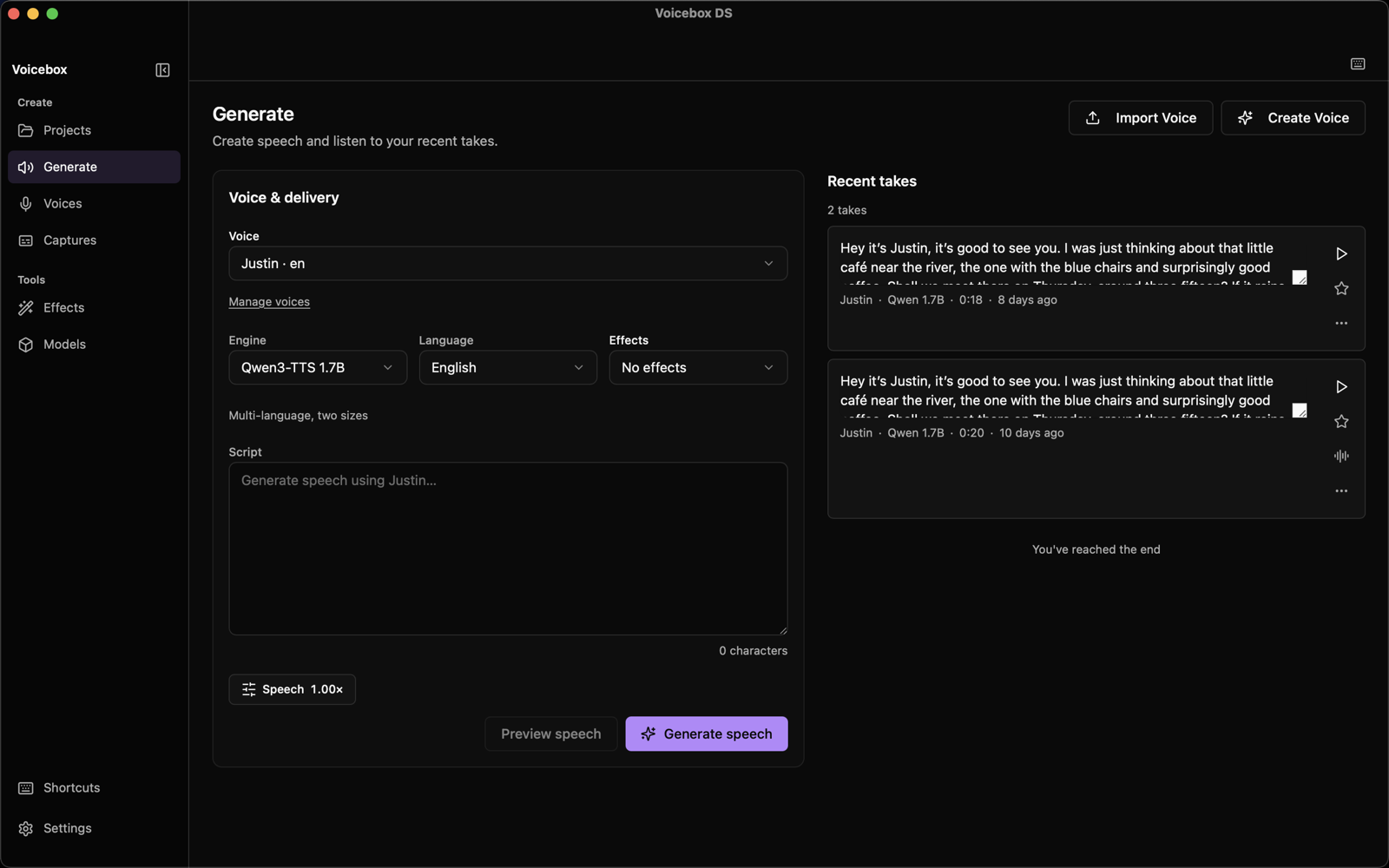
The Generate page in Voicebox DS.
A lot of the changes are smaller. You can choose which microphone to use, and the choice is remembered for recordings and dictation. If that device disappears, the app tells you it's using the system default instead. There's an optional clean reference recording mode, and you can export a reference recording as MP3 or WAV. Effect versions on generated audio can be edited and deleted. Dictation shortcuts that conflict are rejected with an explanation, and desktop update notifications work again.
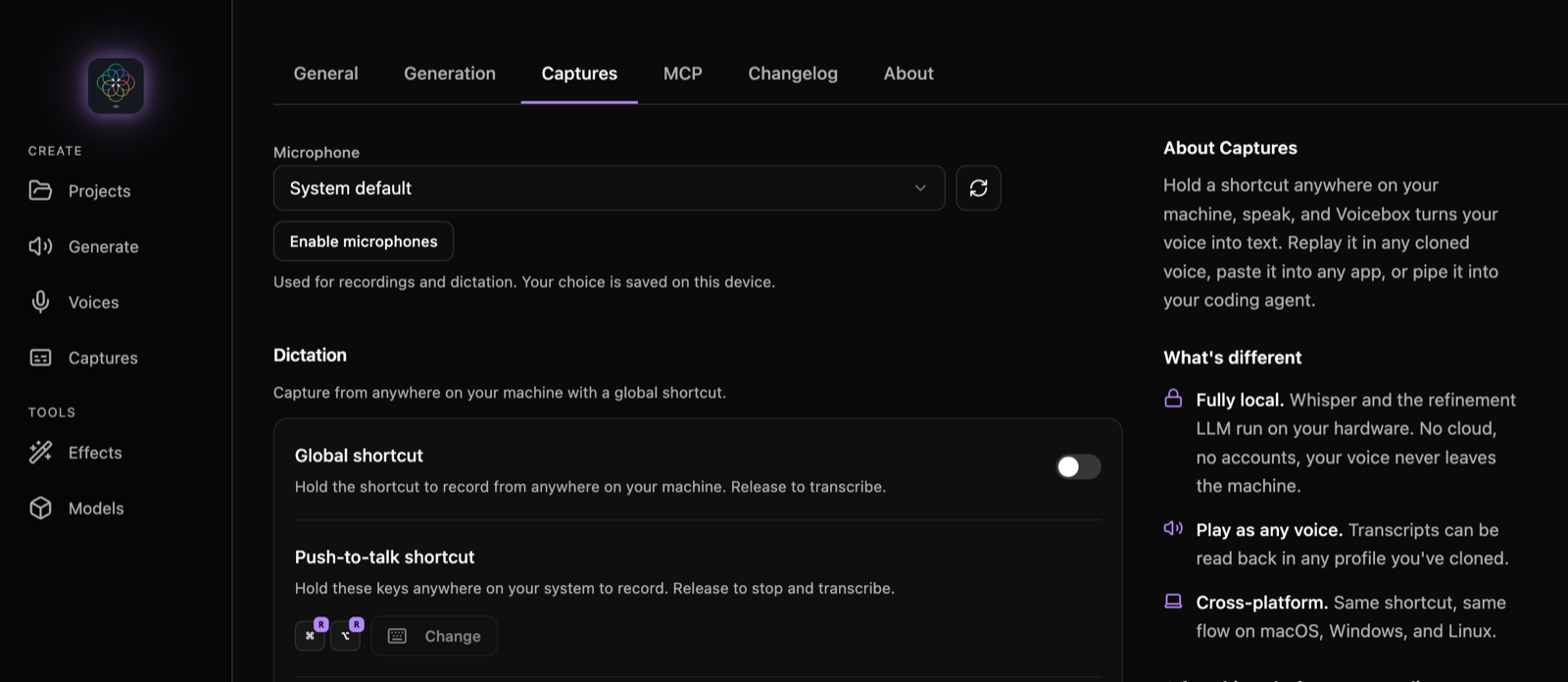
Microphone selection and dictation settings.
Projects for longer work
The biggest addition is Projects, a studio for narration. You paste a script, and blank lines split it into passages. You assign a voice to each passage, generate it, keep alternate takes and compare them, then place the takes on a timeline. In Mix you can trim, split, fade and adjust the gain of each clip, add effects per track, and set loudness and peak targets for the master. Review keeps notes and a checklist for each checkpoint. Deliver renders a WAV (24-bit) or MP3 after checking that every passage has a take.
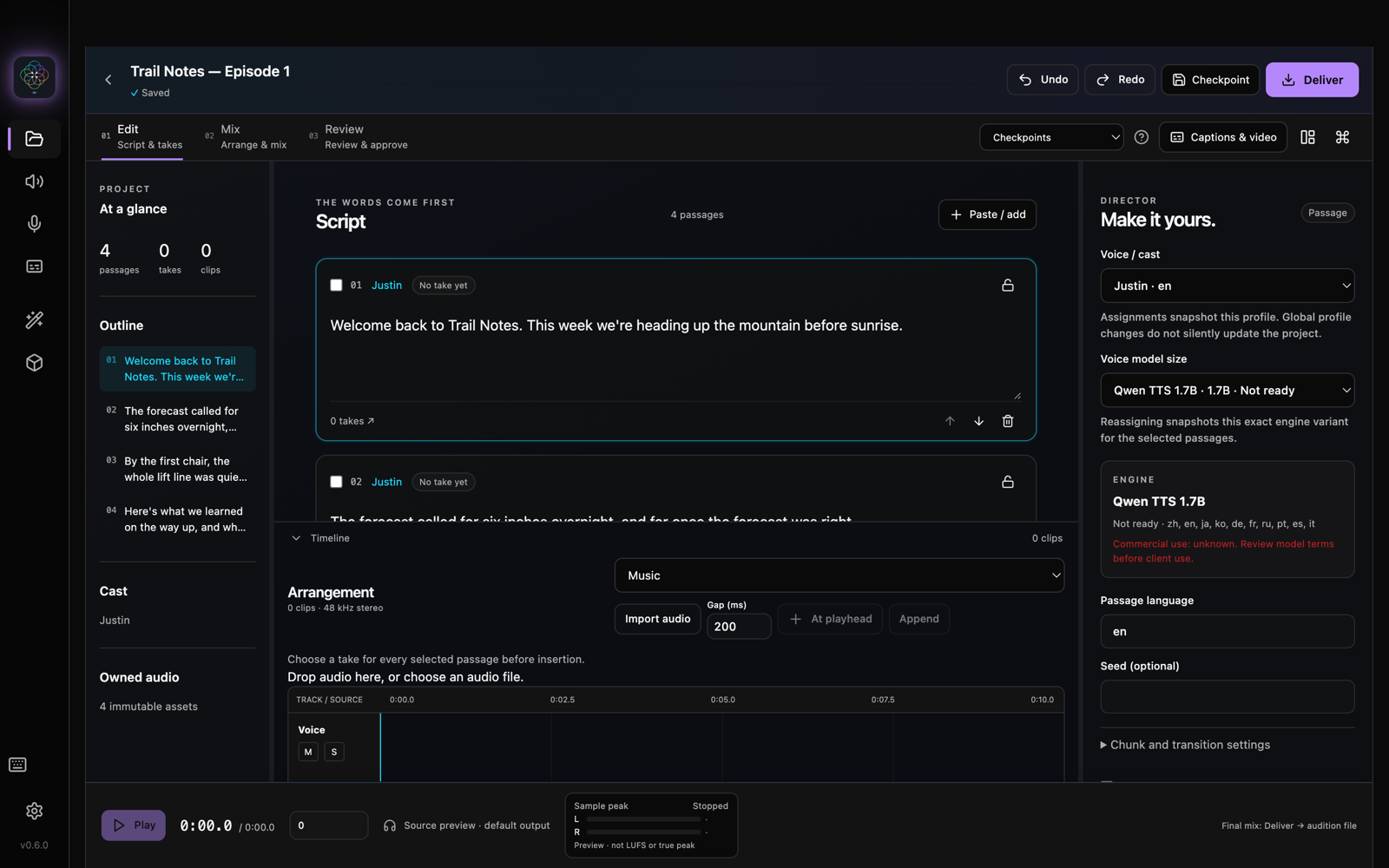
Editing a project's script and cast.
The editing tools are there because generated speech is rarely perfect on the first take. Captions builds subtitles from the words Whisper recognizes. Pronunciation and Phrase Repair help fix a word or phrase without regenerating the whole passage. A speech review compares what Whisper heard against the script and flags words that don't match.
Projects also needed to be safe to work in. They have undo and redo, named checkpoints, recovery after a crash, and archives you can move to another machine. Cleaning up unused audio moves it to a trash you can restore from. If you already arranged something in Voicebox's older Stories view, you can copy it into a project.
Faster on a Mac, and more models
Most of our use is on Apple Silicon. Upstream already ran its base Qwen voice model on MLX, Apple's machine learning framework that uses the GPU through Metal. The fork moves the Qwen CustomVoice and VoiceDesign engines to MLX as well, and adds 8-bit and 4-bit versions of the Qwen 1.7B model. Those are still experimental. Audio streams as MLX generates it. The encoded reference voice is cached, so repeated generations with the same voice skip that step. A model readiness panel keeps up to four engines loaded within a memory budget you set, and can warm up a model before you need it.
There's also a new engine, MOSS-TTS Nano, which clones voices on the CPU for machines without a capable GPU, and Chatterbox Turbo now reuses its voice conditioning between generations. For comparing engines, I added an offline benchmark command and audio quality reports. Windows and CUDA builds are being tested now.
Playback got a lot of attention too. The desktop app now owns its native playback sessions, Bluetooth headphones no longer drop audio, the waveform lines up with what you're hearing, and pauses inside a sentence are kept instead of trimmed. Clips in a longer arrangement are scheduled ahead of time, so they play back to back without gaps.
Tests I could trust
Once I dug into the code, I found the tests weren't at the level I wanted for an app that handles people's own voice recordings. So a large share of the fork's commits add tests, and many of them found real bugs.
Upstream has 54 test files. The fork has 332. The frontend suite runs 760 tests in 116 separate processes, so mocks in one file can't leak into another, and covers about 75% of the lines in the whole frontend. The desktop app's Rust code and the Python server have their own suites, and CI runs them on the fork's branch.
Some of the bugs those tests found:
- A cancellation that arrived late could overwrite a generation that had already finished.
- Deleting a voice sample could remove audio that other files still used.
- Truncated WAV files could start playing instead of being rejected.
- Dictation's auto-paste could replace whatever you had copied to the clipboard.
- After switching servers, an action could still go to the previous one.
- Model download progress was lost if the app reconnected to its server.
Each fix came with a regression test, so the same bug won't come back unnoticed.
Not done yet
Voicebox DS is open source and MIT licensed, like upstream, and I'd like it to grow beyond what one friend needs for his narration. Projects are working, and I'm still testing them on real narration, but there's plenty left to build:
- Pitch shifting inside a project.
- A limiter that meets final true-peak targets.
- Windows and CUDA builds tested on more hardware.
- A notarized release, so you don't have to build it yourself.
- More local models, and better tuning for the ones it has.
If any of that interests you, or you have something of your own you want in a local voice app, fork doublesharp/voicebox-ds on GitHub and open a pull request against the doublesharp branch. The contributing guide covers setup. Fixes that would help everyone can go to upstream jamiepine/voicebox too. Every change in the fork comes with tests, and that suite makes it much easier to change something without breaking something else.
You don't have to write code to help. Trying it with your own voice and hardware and telling me what broke or felt awkward is just as useful. Send bugs, ideas and requests through my contact page. The Voicebox DS page has the full list of changes and setup notes.