Programming
Why I modified Forge for viaIR coverage and AI worktrees
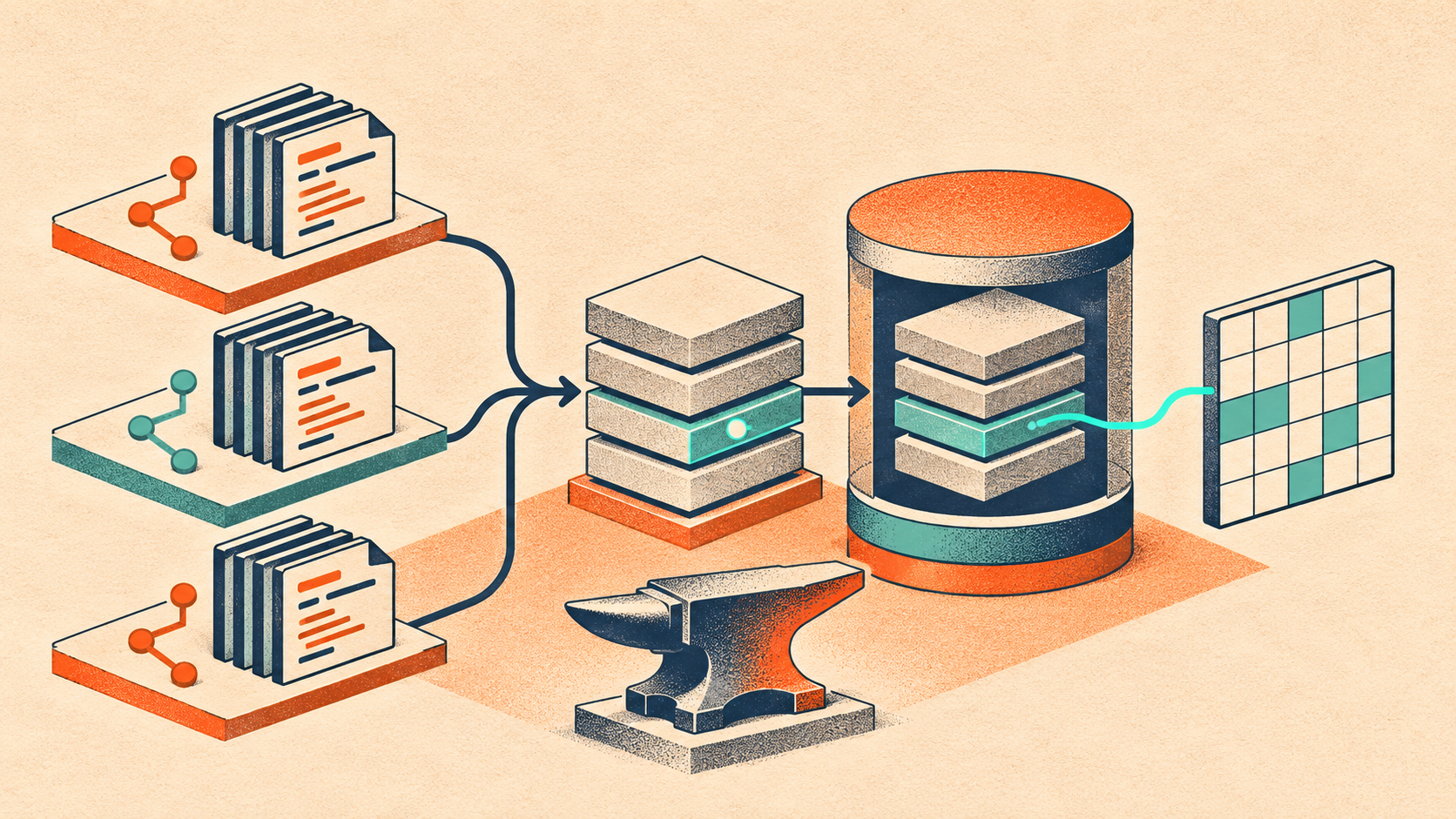
I use Foundry's Forge for Solidity development, but I couldn't get the coverage reports I needed for projects using viaIR. Working with AI coding agents exposed another problem: a new git worktree could mean waiting for the same expensive compilation all over again.
Those two problems became forgeds, my modified build of Forge. It adds source-instrumented coverage that keeps the project's optimizer and via_ir settings, shares compiler results across worktrees, and cuts down the compiler output an agent has to read. It uses the familiar Forge commands and foundry.toml.
Getting coverage with viaIR
The coverage problem came first. Ordinary Forge coverage maps executed bytecode back to source. On the projects I was working on, that path didn't give me the reports I needed with viaIR. Changing the compilation settings or falling back to --ir-minimum wasn't the workflow I wanted.
The instrumented mode takes a different route. It inserts probes into the Solidity source before compilation, compiles with the project's optimizer and viaIR settings, runs the tests, and turns the probe hits into coverage results.
forgeds coverage --instrumented --report summary --report lcovThe reports include lines, statements, functions and branches, including branches inside ternary expressions, short-circuit operators and inline assembly. Compiler warnings point back to the original source rather than making me read the inserted probes.
Keeping the compiler settings does not make the instrumented build identical to a deployment build. The probes change bytecode and gas usage. I use it to measure coverage; gas measurements and deployment checks belong on the normal build.
A new worktree should reuse work already done
Git worktrees give agents separate places to make changes. They also make repeated compilation more noticeable. An unchanged checkout of a viaIR project can spend minutes compiling inputs that another checkout has already compiled.
forgeds stores complete compiler results in ~/.foundry/cache/compilers. The cache key covers the compiler binary, the full standard-JSON input and the compilation arguments. Another worktree with the same request can reuse the result. Different source or compiler settings produce a different request.
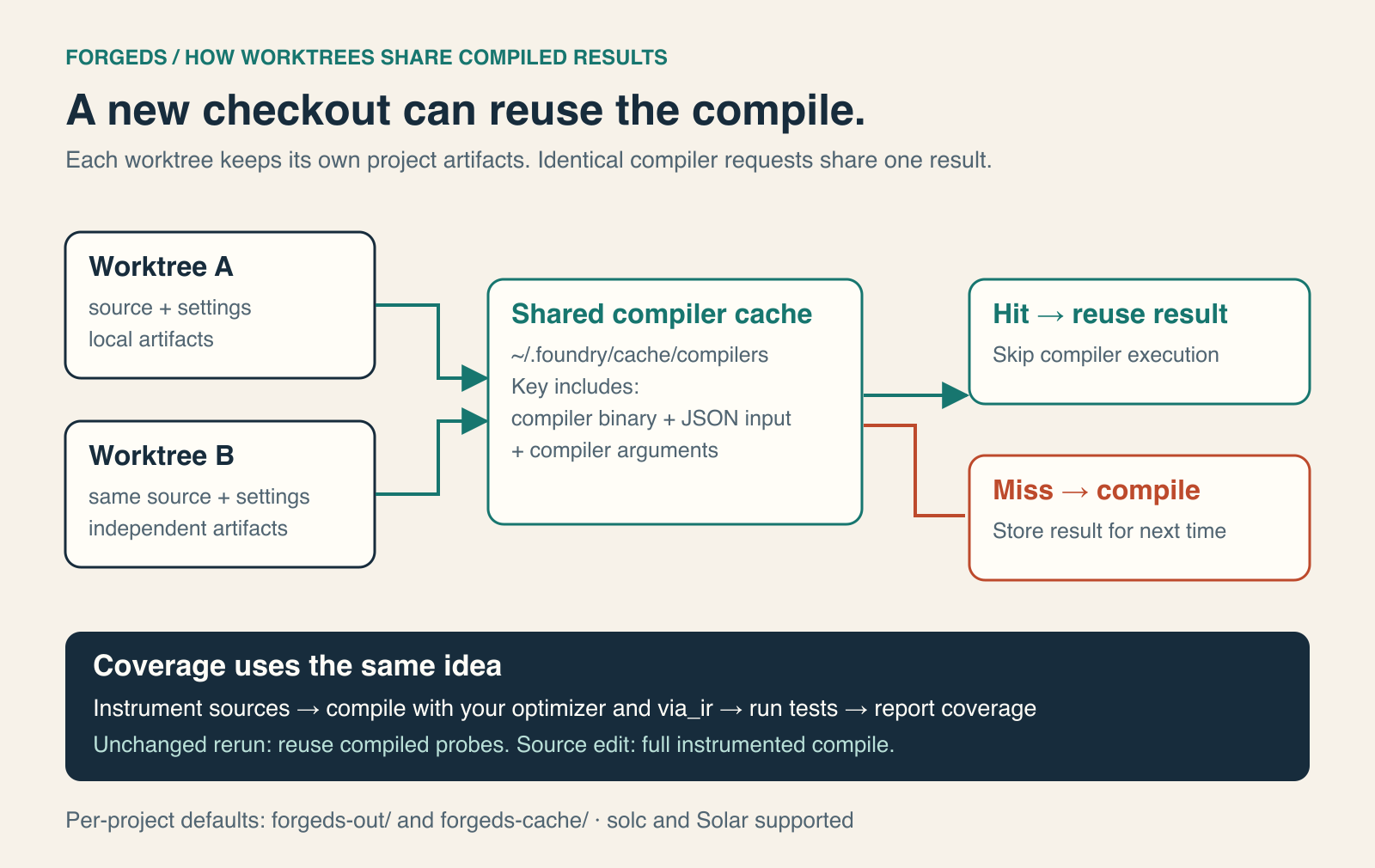
The shared result cache sits alongside each worktree's own artifacts. forgeds uses forgeds-out/ and forgeds-cache/, so I can also use ordinary Forge in the same checkout without the two tools invalidating each other's builds.
One important fix was handling scoped remappings in nested dependencies using solc's resolution rules. Previously, those inputs caused the shared cache to be bypassed. After the fix, the second fresh worktree could reuse the first one's compiler output.
What changed on my projects
The comparison uses Rip.xyz’s NFT marketplace and vault contracts, Ensemble’s tokenized strategy vaults, and Diesis’s chain system contracts and Solidity interfaces.
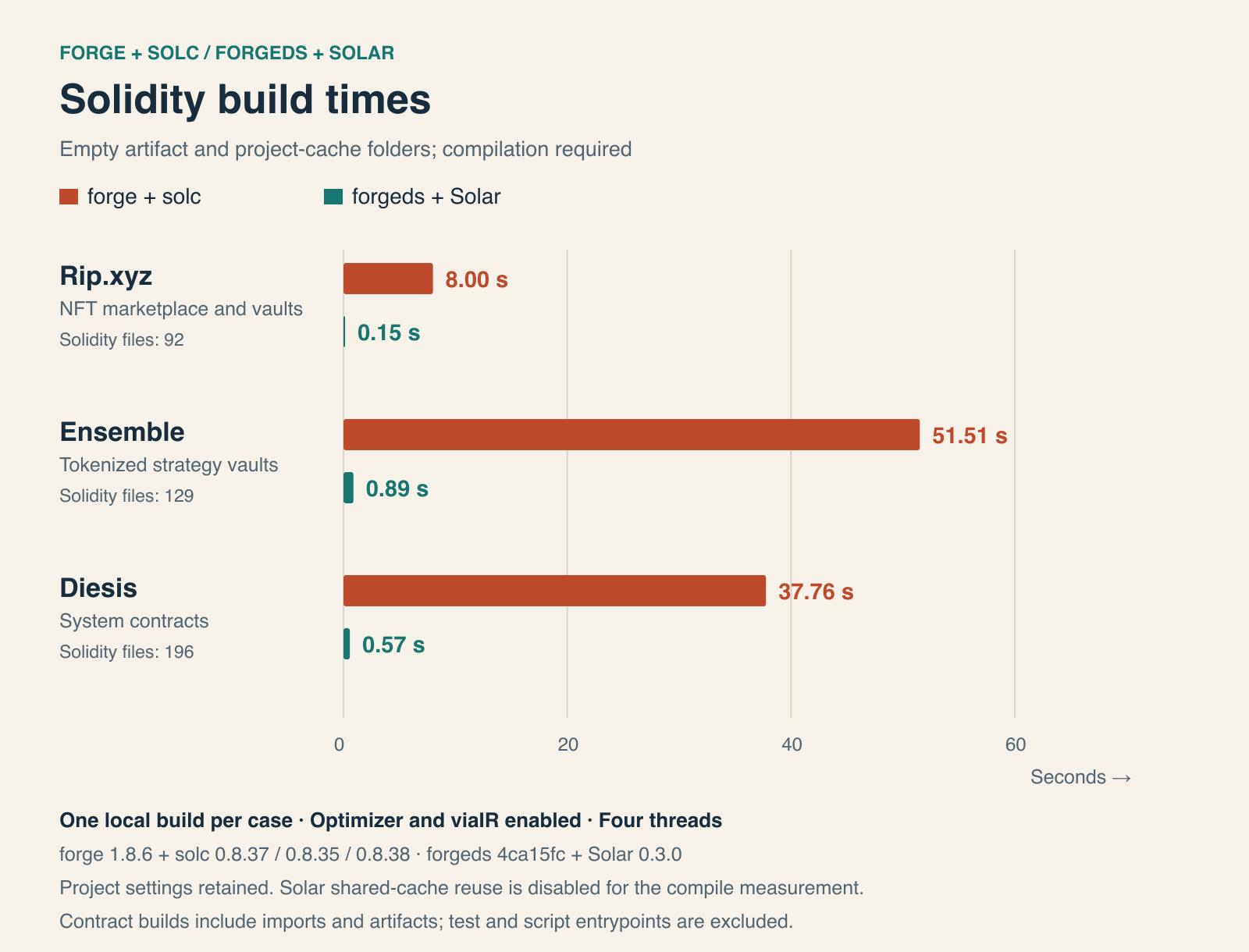
I built the contract sources with test and deployment-script entrypoints excluded. Each toolchain used the same checkout and project optimizer and viaIR settings, with Foundry set to four threads. Both started with empty artifact folders and project caches. The figures show one local build per case, including artifact generation.
For compilation, the results were Rip.xyz: 8.00 seconds with forge + solc and 0.15 seconds with forgeds + Solar; Ensemble: 51.51 seconds with forge + solc and 0.89 seconds with forgeds + Solar; Diesis: 37.76 seconds with forge + solc and 0.57 seconds with forgeds + Solar.
On another build with fresh artifact folders and project caches, forgeds + Solar finished in 0.09 seconds for Rip.xyz, 0.89 seconds for Ensemble, 0.18 seconds for Diesis. Rip.xyz and Diesis reused shared compiler results; Ensemble repeated the compilation. Each repeat run produced the same Solar artifacts as its uncached build. The forge + solc baseline is the same build shown in the first chart.
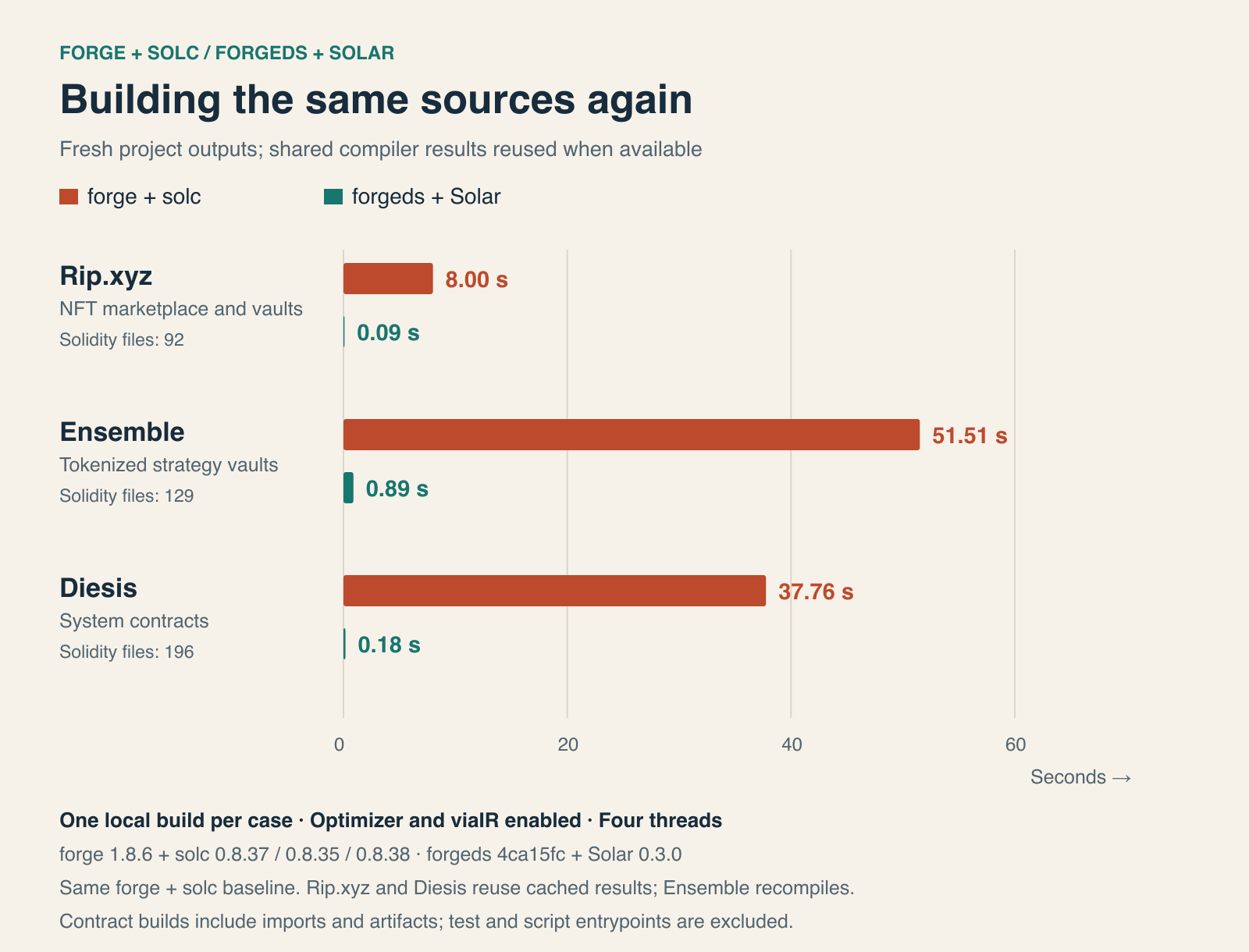
The comparison uses forge 1.8.6 with each project’s pinned solc: 0.8.37 for Rip.xyz, 0.8.35 for Ensemble and 0.8.38 for Diesis. The other toolchain is forgeds 4ca15fc with Solar 0.3.0. These are build timings; they exclude running tests.
Instrumented coverage can reuse the compiled build too. Tests and coverage analysis still run. Editing a source file triggers a full instrumented compile, so focused tests remain useful while making changes.
How I use Solar with forgeds
I pair forgeds with Solar for compatible development builds and tests. That is also the workflow in my ds-solidity skill in dsstack: use Solar for local and CI development checks through the project's wrappers, preserving its Solidity and EVM settings.
Install Solar separately, honoring the project's version pin, and make sure both tools resolve from Cargo's bin directory. For a project that supports Solar, the commands are:
cargo install solar-compiler --locked
forgeds build --use solar
forgeds test --use solar --mt <test_name>
forgeds coverage --instrumented --use solar --report summary --report gaps
The shared compiler cache works with both solc and Solar. Each compiler has its own cache keys, so switching compilers needs that compiler's matching cached input. An unchanged instrumented coverage rerun can skip compilation, but the tests and coverage analysis still run.
I keep the project's approved compiler for deployed bytecode, required coverage and release artifacts, and retain any coverage modes the project requires. Solar gives me a faster development loop where it is compatible.
Give the agent the information it needs
Build time was only part of the friction. Repeating warnings from unchanged files fills the terminal and consumes an agent's context. I added an opt-in setting to show warnings only for files compiled in the current run:
[profile.default]
compiler_warnings = "changed"
With compiler_warnings = "changed", forgeds shows warnings for files compiled in the current run and counts the warnings hidden from unchanged files. Errors and warnings that the project’s deny settings turn into failures remain visible. The default is all, so the quieter behavior needs to be enabled.
Missing-import errors are shorter too: each unresolved file appears once, with only the remappings that could apply to it.
For coverage, --report gaps returns a compact JSON list of uncovered items. That gives an agent a concrete place to start when adding tests.
forgeds test --mt <test_name>
forgeds coverage --instrumented --report summary --report gaps
Download forgeds
You can download forgeds from GitHub for macOS with Apple Silicon, Linux on x86_64 or arm64, and Windows on x86_64. Build 4ca15fc is marked as a prerelease. Each archive has a SHA-256 checksum. Intel Mac users need to build from source.
The release page has downloads for the latest build and files named for a specific commit if you want to pin a version. forgeds_latest.txt lists the latest commit, and forgeds --version shows the commit you have installed.
I've put the installation commands, Solar setup and cache checks in the Library guide. For more detail, see the feature guide and compiler-cache documentation.